Confirm the invoice amount
Agree the service scope and exact amount with PNHR first. This page publishes no service price and the QR does not include a payable amount.

The bank-transfer and UPI details below are handled by PNHR’s sister-concern firm, M/S INDIA CLICKZ (Proprietorship)—they are not PNHR’s own account or QR. Use them only for an agreed PNHR invoice; no amount is prefilled. Verify the recipient before authorising payment.
The QR uses indiaclick@icici and has no fixed amount. Its encoded recipient label and reference are disclosed below; check them before proceeding.
This page displays payment details only. It does not receive a transfer or confirm a payment; your bank or UPI app handles the authorisation.
Agree the service scope and exact amount with PNHR first. This page publishes no service price and the QR does not include a payable amount.
M/S INDIA CLICKZ is PNHR’s sister-concern proprietorship handling these payment details; this is not a PNHR bank/UPI account. The QR encodes indiaclick@icici, app-recipient name MAYANKMISHRA and fixed reference EZYS9838991199. If these do not match the recipient expected for your invoice, stop and contact PNHR.
After your bank confirms a transfer, retain its receipt or UTR. Share the reference with PNHR at hello@pnhr.in or +91-8896973800 for reconciliation; this page does not issue a payment confirmation.
The bank account and UPI QR are handled by PNHR’s sister-concern firm, M/S INDIA CLICKZ—not PNHR itself. Use only for an agreed invoice and verify the recipient before confirming.
UPI ID: indiaclick@icici
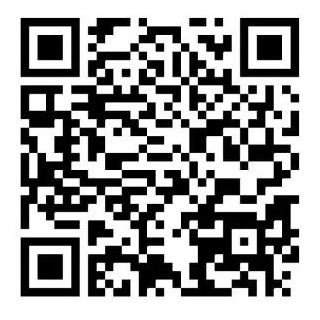
Check before authorising: this sister-concern QR is not PNHR’s own UPI account. Its payload contains recipient name MAYANKMISHRA and fixed reference EZYS9838991199; your UPI app may display that name/reference. The bank account holder is M/S INDIA CLICKZ. If the displayed details are unexpected, stop and contact PNHR.
These are the sister-concern proprietorship’s bank details, not a PNHR account. Transfer only the amount on your agreed PNHR invoice.
If your question is specific to an invoice, contact PNHR directly so the answer can be confirmed for your request.
No. The QR can open your own UPI app, but this website does not take payment details, submit a transfer or confirm payment. Your bank or UPI app asks you to review and authorise it.
M/S INDIA CLICKZ is the sister-concern proprietorship handling this bank/UPI payment route; it is not a PNHR bank account or QR. The account holder is M/S INDIA CLICKZ. The QR is encoded with UPI ID indiaclick@icici, recipient label MAYANKMISHRA and fixed reference EZYS9838991199. Check the name/reference against your invoice; pause and contact PNHR if unexpected.
Pay only the exact amount shown on the invoice or payment instruction agreed with PNHR. The QR contains no amount, and this site does not list service prices.
Keep the bank receipt and share the UTR/reference plus your invoice or service reference with PNHR at +91-8896973800 or hello@pnhr.in. Payment reconciliation depends on bank confirmation.
If the amount, bank beneficiary, UPI recipient or QR reference is unexpected, pause and ask PNHR to confirm before authorising payment.